
Sparx reader - fAq
Sparx Reader Frequently Asked Questions
- I can’t log in at home as I don’t know my username and password:
There is no separate username and password. When students click on the log in for Sparx Reader, they simply need to click on the purple bar ‘Log in to Sparx Using Microsoft’:
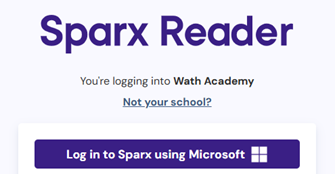
Students should log in using their usual school Microsoft username and password.
- Sparx is taking me too long and I’m not getting any points:
One of the most common reasons for this is that students may be reading too quickly or scrolling ahead to the questions without fully engaging with the text. This can affect comprehension and reduce the number of points earned.
- I timed myself for 30 minutes and I didn’t get enough points for my homework:
300 Sparx Reader points typically take around 30 minutes to complete. Depending on the task, this may sometimes be slightly more or less. Where students are rushing and reading too quickly (as above), the points will take them far longer to achieve.
- My tutor gave me a negative but I have completed 300 points:
The deadline for Sparx Reader homework is Monday at 8:30am. Tutors award completion points during Monday tutor time. If students complete work after the deadline, Sparx may allow additional points to be credited towards previous weeks, which will update school reports. However, any Bromcom consequence points issued before the late completion will remain in place.
- I have additional needs and Sparx is too difficult for me:
Sparx is based on an individual reading test for every student. Books offered to students are reflective of their reading ability and provide the right level of challenge for them to complete this individually and independently. The programme does not read the text to students as the purpose is for students to read carefully. Due to the reading test, the text and questions should provide the right level of challenge for all students. The programme adapts to each student's reading assessment and is designed to provide an appropriate level of challenge. If parents have concerns about accessibility or suitability, they are encouraged to contact the school for further support.
- I struggle to read text on a screen:
Students can change the settings for their Sparx by clicking on the settings in the top right of their screen and amending any of the following:

- The timers are putting me off:
The only timer in the whole programme is a small discrete timer on the four multiple questions. This is reflective of the speed of working for each individual student. The timer has been designed to support progress monitoring while minimising pressure on students.
- What are the rewards for Sparx Reader:
Students will achieve weekly positive Bromcom points for completion. Students can also earn milestone certificates and pin badges, which are presented during half-termly rewards assemblies.
- Will we be expected to complete Sparx over school holidays?
Sparx will not be set within the school holidays. Sparx will be set as normal on the Monday of the final week of term and this will have a deadline set of the first day when we return to the Academy.
- I don’t have a device at home that I can complete my Sparx Reader:
Students who do not have access to a suitable device at home can attend one of the school's homework clubs, which run throughout the week.